
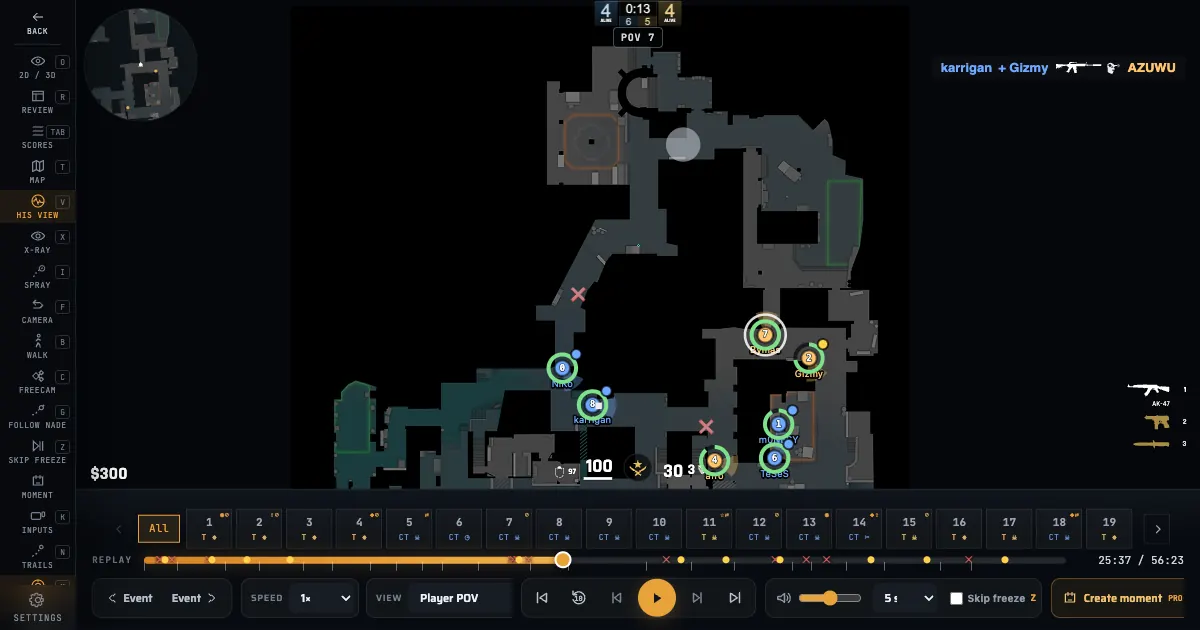
The Memorin 2D demo viewer is the same replay as the 3D viewer, drawn on the map radar instead of in a 3D world. Same demo, same timeline, same rounds — one canvas instead of a scene.
Can you watch a CS2 demo in 2D?
Yes. Memorin plays a Counter-Strike 2 demo top-down on the same radar image the game uses, with every player, the bomb, grenades and kills drawn on it. No 3D map geometry is downloaded, so the round starts almost immediately.
What you see on the radar
- All ten players as named dots, with a health arc and the team colour.
- Short motion trails, so you can read where a duel came from.
- Kill tracers from the shooter to the victim, and markers where people died.
- The bomb carrier, the planted bomb and the defuser.
- Smokes, molotovs and flashes where the demo recorded them.
- On Nuke, Vertigo and Train, players on the other level as hollow rings.
- Pan, zoom, pinch, double-tap to recentre, and click a player to follow them.
2D or 3D: which view to use
Both views play the same demo and share the timeline, the round list and the follow target, so switching costs nothing. Use 2D to read positions, rotations and utility across the whole map; use 3D, a PRO feature, when you need to see what a player could actually see. The numbers below are the first-frame measurements taken on de_nuke in Chrome on an M4 MacBook Air, eight interleaved runs per view.
| 2D radar | 3D world (PRO) | |
|---|---|---|
| First frame, cold cache | 293 ms | 1883 ms |
| First frame, warm cache | 254 ms | 1692 ms |
| Peak JavaScript heap | 44 MB | 107 MB |
| Map geometry download | none | the map .glb |
| Devices | phones, tablets, old laptops | a machine with a working GPU |
| What you see | the whole map at once | the round from inside it |
| Audio | silent | positional match audio |
How do I switch between the 2D and 3D views?
Press the O key, or use the 2D and 3D segmented control in the session bar. Switching to 3D is PRO, except on the sample demos, which play in 3D for free. The playhead, the round and the player you follow all carry over, because both views play the same replay. You can also make 2D the default under Settings, Display, Default view.
How do you open a CS2 demo on a phone?
Open the 2D view in a mobile browser. It draws one radar canvas instead of a 3D scene, so it does not fetch map geometry, agent models or lightmaps, and it supports pan, pinch zoom and tap to follow a player.
Is the 2D demo viewer free?
Yes, the 2D radar view is free, and pro matches and the sample demos open in it with no account; your own demo needs a free Steam sign-in. The 3D view is PRO, except for the sample demos, which play in 3D with no account. It is the fastest way into a demo on a slow connection or an old laptop, so it is deliberately not behind the PRO tier.
Recorded evidence, not invented gameplay
The radar draws the state the demo recorded, at integer-tick precision. Positions, deaths and grenade events come from the parsed demo; nothing that was never recorded is reconstructed as if it were known. The methodology page explains which facts are recorded, derived or unavailable.